




Accessibility & WCAG 2.1 Level AA Compliance Guide
A complete guide to what WCAG 2.1 Level AA is, why it matters, and what actions colleges need to take to ensure adherence to the regulations, before the April 24th 2026 deadline.
Compliance is top of the agenda for higher education institutions across the US.
Following new legislation, published by the U.S. Department of Justice under Title II of the Americans with Disabilities Act (ADA), colleges and universities will be required to make sure all their webpages, online course content and mobile apps are accessible to people with disabilities.
Commonly understood through the lens of the Web Content Accessibility Guidelines (WCAG) 2.1 Level AA, from April 24th 2026 adherence will be mandatory. For institutions, it is useful to think of the Web Content Accessibility Guidelines (WCAG) 2.1 Level AA as the digital manifestation of Universal Design for Learning (UDL). In other words, if you design for the margins, you improve the experience for the center.
Historically, many colleges have operated on a reactive model; responding to needs as and when they arise. The new regulations effectively bring the request and remediate era to an end. Digital content must be accessible by default before a student even asks for it.
Relying on good faith efforts is no longer a valid legal defense. With many institutions relying on hundreds of third-party tools, due diligence is needed now more than ever. According to the guidelines, the college itself is liable for a vendor’s lack of compliance.
Here we’ll explore exactly what WCAG 2.1 Level AA is, why it matters, and what actions colleges need to take to ensure adherence to the regulations, before the April 24th deadline.
What is WCAG 2.1 Level AA?
WCAG 2.1 Level AA is the most widely recognized global standard for web accessibility.
In the same way that building codes ensure physical campus buildings have ramps and elevators, WCAG 2.1 AA ensures digital buildings, like your Learning Management System (LMS) or Student Portal, are navigable by everyone.
AA is the sweet spot for higher education
It removes the most common barriers for disabled students while remaining technically achievable for large, complex institutions. Digging into the details of the regulations, you’ll find they cover essential areas like color contrast ratios, consistent navigation, and live caption on videos.
WCAG compliance allows those with disabilities, as well as temporary ailments, to have the same online experience as anybody else. The move to 2.1 is a significant digital transformation milestone because it addresses how students actually use technology today.

Why does WCAG 2.1 AA compliance matter?
WCAG 2.1 AA compliance matters because digital accessibility is no longer a nice to have, it is a fundamental requirement for the modern educational experience.
In higher education, the impact of these standards spans three major areas; legal risk, student success, and institutional equity.
Compliance isn't just about the university’s homepage. It covers almost every digital touchpoint a student or employee interacts with.
The reality is that while these regulations are about providing equitable access, accessible design actually helps everyone.
Accessibility directly correlates with whether a student finishes their degree, ensuring that students with disabilities don't face digital barriers that lead to higher dropout rates. Should institutions fail to comply, they could face a number of sanctions. As well
as lawsuits, violations can result in federal fines of up to $75,000 for a first violation and $150,000 for subsequent ones.
Likewise, non-compliance can jeopardize an institution’s eligibility for federal grants and student financial aid programs further
threatening the long term viability of the institution both financially, but also reputationally.
Digital touchpoints affected by WCAG 2.1 AA compliance
- Learning Management Systems (LMS): Platforms like Canvas, Blackboard, or Moodle must be fully accessible.
- Course materials: PowerPoints, PDFs, and Word documents uploaded by faculty must meet accessibility standards (e.g., proper heading structures and alt-text).
- Student portals: Registration systems, financial aid portals, and housing applications.
- Classroom tech: E-readers, specialized software, and interactive tools used during lectures.

What steps do institutions need to take now to ensure compliance?
The 2026 deadline is close, but there is still time for a structured, strategic rollout if organizations start now.
To meet the WCAG 2.1 Level AA standards by the federal deadlines, higher education institutions must move beyond fixing things as they break to a proactive, campus-wide strategy.
In reality, the shift is from providing reactive accommodations to proactive accessibility, ensuring everyone can use the content from day one. This is being inclusive by design in practice.
Institutions must raise awareness of the deadline and the need to meet compliance requirements.
The most urgent actions to take ahead of the 2026 deadline
Audit all things digital
Colleges should look to conduct a comprehensive digital audit to identify every student-facing platform, including public sites, Learning Management Systems (LMS), and internal portals. This will allow them to distinguish between active content that must be remediated and legacy materials that qualify for archived safe harbor.
This however should not be seen as a one off. Continuous monitoring is an ongoing operational requirement for accessibility adherence.
Centralize governance and training
Compliance fails when it’s treated as someone else's job. Institutions must build a centralized system of accountability. By moving accessibility from a web team task to a campus-wide mandate, compliance becomes business as usual rather than a task to be completed.
Updating procurement policies, providing faculty with accessible templates for course materials, and combining automated scanning with manual user testing are essential activities.
Enforce strict vendor accountability
Under the new rules, the university is responsible for the accessibility of the tools it chooses to use. Therefore, colleges must review all third-party contracts to ensure vendors provide updated Accessibility Conformance Reports (ACRs) for WCAG 2.1 Level AA.
Look for full vendor transparency and comprehension of the requirements. You can find out more about Genio’s accessibility stance by viewing our ACR (VPAT) and remediation plan.
What questions should institutions be asking vendors?
It is vital that you're using the right software for your institution and students.
As such, colleges must take the necessary steps to avoid taking vague claims of compliance at face value, and do a little digging under the surface to truly understand the validity of any test.
To help with your decision, it’s important that you’re equipped with the right questions to ask your vendors, to ensure both you and they are meeting compliance guidelines and, most importantly, providing truly accessible solutions.
Accessibility
To meet the ADA Title II deadline of April 24, 2026, don’t just ask vendors if they’re compliant.
- How does the vendor maintain WCAG compliance and what testing is in place for new features?
- How does the vendor deal with accessibility bugs in product development?
- Does the vendor provide appropriate Accessibility Conformance Report (VPAT) documentation?
- Is accessibility testing performed manually, or using automation? Is a third party used for objective testing?
- Does the vendor's software rely on an accessibility overlay/widget?


Data security and storage
Protect your institution from legal liability and ensure the safety of your students’ personal data.
- Who owns the data once it enters the vendor’s system?
- What provisions ensure the vendor treats user data appropriately?
- What access controls are in place to ensure only authorized persons have access to stored information and notes derived from the recordings?
Third-party implementation
If you approve a product, you also approve their third-parties! Safeguard student privacy by ensuring ethical data standards and AI usage.
- Is a transparent, readily-accessible list of third-parties available?
- What provisions are in place to ensure vendor’s third-parties treat user data appropriately?
- Are third-parties allowed to train AI models using this data?

.png?width=400&height=400&name=ILL_COMPARE%20admin%20notes%20assistive%20tech%20vs%20laptop%20rosette%20(1).png)
Delivering value and impact
Before you take their word that the tool works, check for objective and ideally third-party research to verify their statements. Dig a little deeper to find out their commitment to ongoing support!
- How does the vendor evidence the impact and effectiveness of their tool?
- What is the vendor's experience working with different departments to roll out their product effectively, ensuring maximum impact and minimal disruption?
- What support does the vendor offer customers and their students post-purchase?
Genio’s approach to accessibility
At Genio, accessibility is part of our DNA. Since 2007, we have created accessible technologies that have positively impacted over 160,000 students across 1000+ institutions.
Our core philosophy is to combine accessible design with learning science to create tools that address the fundamental challenges preventing learners from thriving in education.
We care deeply about accessibility and invest heavily in it, ensuring that we will meet all WCAG 2.1 AA guidelines ahead of April 2026. In doing so, we strive for our future vision of a world where every person has the tools and confidence to expand
what’s possible through learning.
As part of this, we regularly complete ACR (VPAT) testing, via third parties, to hold ourselves to account and ensure our product development has accessibility baked in, rather than bolted on.
This point is particularly important as accessibility overlays only provide surface-level visual fixes, failing to address underlying source code issues. This can cause additional issues with existing assistive technology, poor user experience and a false sense of legal security and compliance.
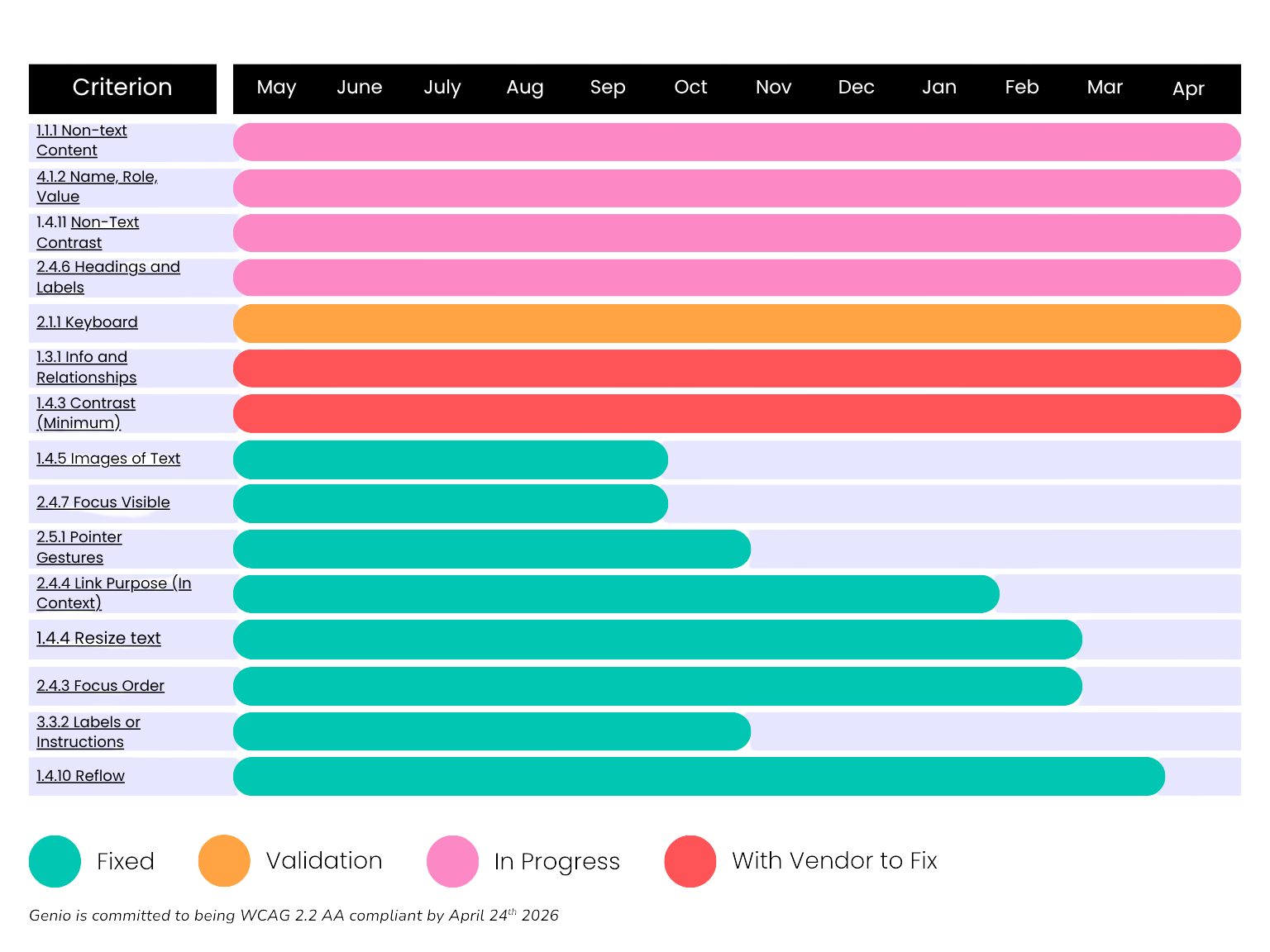
Genio is committed to becoming WCAG 2.2 Level AA compliant
Even though the requirement from the ADA is to meet 2.1 AA standards, Genio have taken a proactive approach to becoming WCAG 2.2 AA compliant, improving our already robust standing and guarantee accessibility for all learners.
As well as maintaining a team of internal accessibility experts, we are constantly striving to improve our understanding of, and skillset around, accessibility.

Watch our webinar: Meeting the New Digital Accessibility Standards
AA, and how Genio can help you ensure
your adherence to the new accessibility
standards, watch our webinar.