

















Some of the most demanding degrees, those in Science, Technology, Engineering, and Math (STEM), present students with an overwhelming combination of heavy schedules, cumulative learning, and highly complex content like equations and diagrams.
For the New Majority of learners (such as first generation, working, or disabled students), these challenges can quickly lead to disengagement and even dropping out.
Our recent webinar demonstrated how Genio Notes is proactively addressing these systemic barriers with a suite of UDL-aligned tools, including an exclusive first look at major upcoming features for Fall 2025. You can watch the highlights, and a short demo from Callum, over on our YouTube channel!
What challenges are STEM students facing?
For some students, STEM learning can be inherently difficult, but for many students, the greatest struggle lies in managing the volume, complexity and presentation of the material.
Heavy class schedules and the sheer volume of material lead to stress and overwhelm, making time management absolutely crucial, yet this can be difficult for some students, especially those with other commitments such as parents.
This stress accelerates the disengagement cycle, which can be "particularly disastrous" in cumulative subjects where content constantly builds on prior knowledge.
For the "New Majority" of higher education learners, which includes adult learners, first generation attendees, and students with disabilities, learning must be efficient and focused due to being time and attention poor. True equity is achieved when accessibility is woven into the education environment wherever possible and not something that's simply bolted on afterwards.
How can Genio Notes help STEM students?
Genio’s CORA Framework for STEM Success
Genio organizes its features around the CORA framework (Capture, Organize, Refine, Apply) to ensure every tool supports active learning and mastery. During our recent webinar, Product Manager Callum showcased several key features designed specifically for technical content.
Capture: Engaging with complex content
The goal is to move passive learning material (like lecture slides) into active engagement. Here’s how Genio Notes features support this:
-
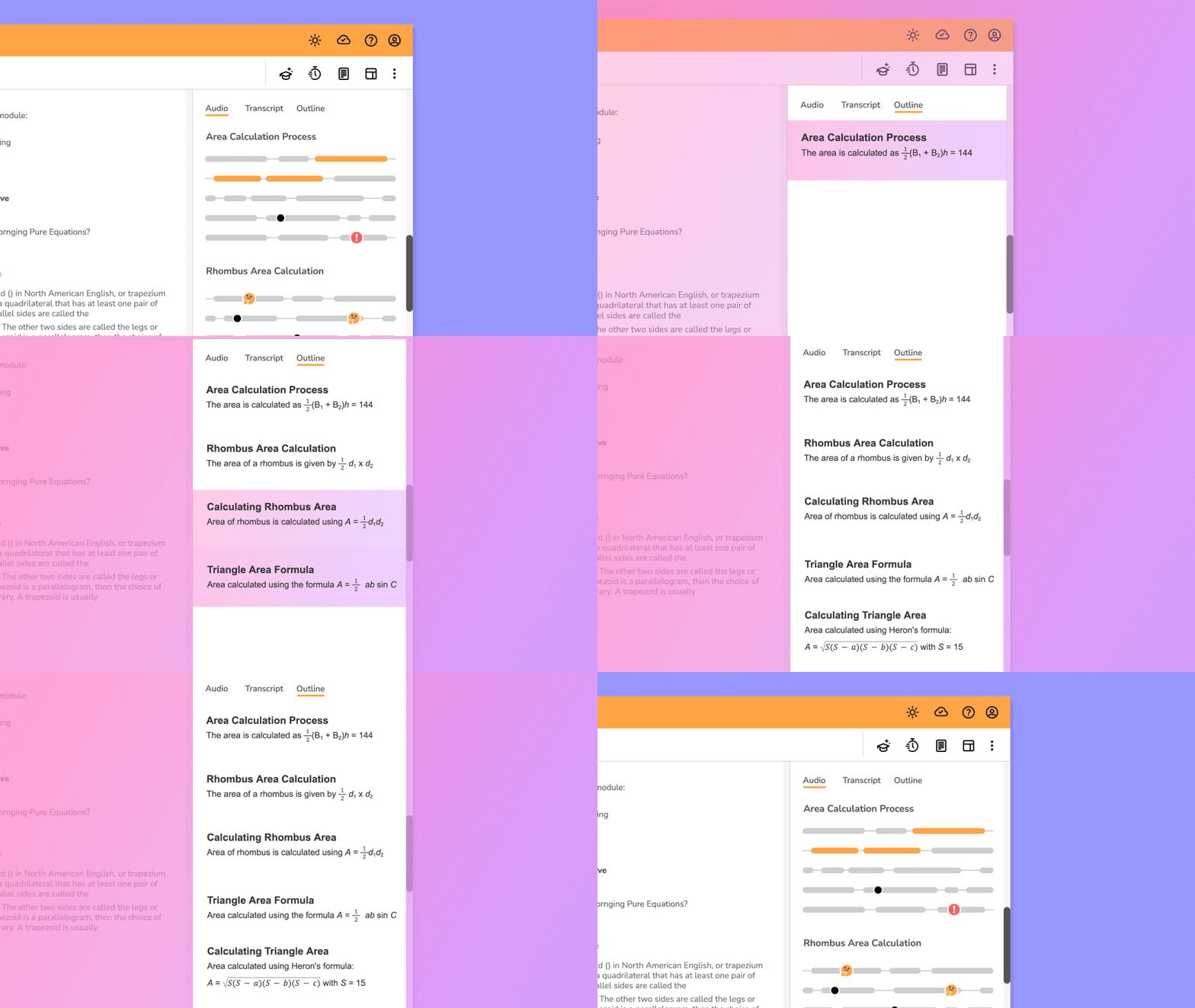
Equation support: Genio is rolling out enhanced support for formulas, including adding them to event Outlines and integrating them into the Quiz Me feature. This means students can now generate self-testing quizzes that include relevant formulas, allowing them to "boost that retention" and "identify any knowledge gaps".
-
Visual annotation: Learners can now write, draw, and annotate directly onto lecture slides or PDFs using the Slide Annotations and Scribble features. This feature, co-designed with STEM students, is vital for breaking down overwhelming diagrams and equations. A study on medical and dental students found that annotation and visual elements were "pivotal" for digital note taking. Additionally, the Scribble feature allows users to sketch out concepts with digital pens and shapes for deeper engagement.
-
Easy information upload: Students can quickly take a photo of a whiteboard or graph using the Genio app and upload it directly to their notes, ensuring rapidly erased content is never missed.
Organize: Mastering the heavy schedule
To combat overwhelm, students need simple tools for material management. To help keep notes and study materials organized, Genio Notes users can use:
-
Collections and Search: STEM topics often span multiple lectures. Collections allow students to easily organize events by course or topic in a way that makes sense to them, while the powerful Search feature retrieves concepts across notes and transcripts.
-
Event reminder: This tool helps manage the demanding schedules of STEM students by allowing them to schedule new events within Genio and sync them directly to their preferred external calendar.
Refine & apply: Active learning
Our new features aim to enhance the post lecture process, ensuring learners are truly ready to study.
-
Speaker diarization: This recently released feature automatically separates and labels each speaker in a transcript, allowing learners to easily identify contributions from the lecturer versus other students, which is especially useful in engaging (and often noisy) lecture settings.
- Equation support in Outline: Formulas and equations are now supported in Outline, ensuring STEM students have an accurate recording to navigate across when studying. Outline gives a structured set of highlights from each recording, helping to prioritize study sessions and efficiency.
-
Equation support in Notes and Transcripts (coming soon): Addressing a major pain point, Genio Notes will soon display complex formulas directly within the transcripts. This update shortcuts the manual process of converting what was said into a formula, allowing instant, flexible engagement.
The institutional payoff when students feel supported
By implementing UDL tools institution wide, the benefits extend far beyond individual accommodations to impact core institutional metrics. Volunteer State Community College saw compelling results after adopting an institution-wide license:
-
Confidence soared: 89% of students reported feeling more confident about their studies after using Genio tools.
-
Retention improved: Students using Genio Notes achieved an 88% retention rate from fall to spring, compared to 77% for non-users. Freshmen using the tools were 11% more likely to persist from their first to second semester.
This efficacy demonstrates that Genio Notes addresses systemic barriers to academic success, particularly for the New Majority Learners who are often missed by traditional support services.
The evidence is clear, supporting students through active, accessible technology is essential for success in demanding technical fields.
The conversation doesn't stop here! Rewatch the full webinar to see live product demos and learn how to implement Genio’s UDL-aligned solutions at your institution.
Share this blog





Time for a simpler, smarter note taking accommodation?