


















At Genio, we know that learning isn’t a one-size-fits-all process. Everyone has their own unique way of tackling a subject, and your study tools should be flexible enough to match that.
That’s why we’re updating one of our most popular features: Quiz Me. These new customization options are designed to give you more control over your retrieval practice, helping you focus on exactly what you need to master.
Plus, we’ve added a brand new way to test yourself across multiple Events with Quiz Me in Collections.
Quiz Me, your way
Until now, Quiz Me has been a great way to generate a quick set of five questions you can use to test your knowledge. But sometimes, you need to dive deeper or focus on a specific aspect of a lecture.
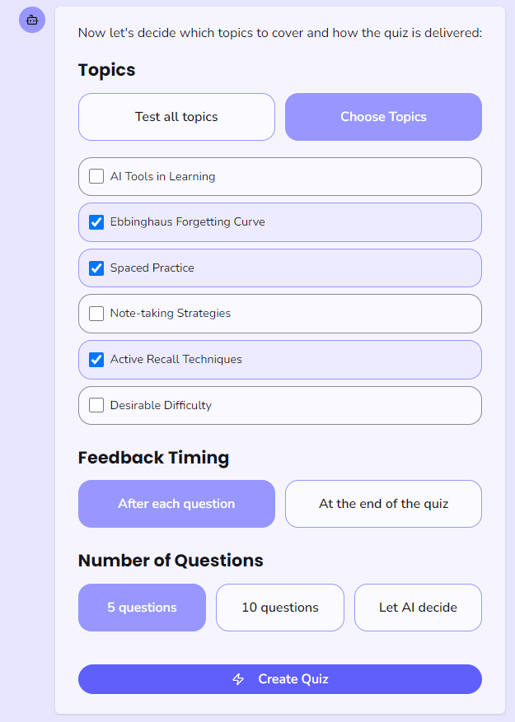
When you open Quiz Me for an Event, you’ll now see an option to ‘Customize my quiz’. Here you will find a series of new customization options:
- Lecture materials: You can now choose to generate questions based on the content of attached slides or PDFs, alongside the transcript. This is perfect for STEM subjects where exams focus heavily on diagrams and visual data.
- Topics: Quiz Me now detects specific topics within your transcript. So if you only want to practice the "Cell Mitosis" section of a biology lecture, you can select that specific topic for your quiz.
- Number of questions: Whether you want a rapid review or a more thorough test, you can now choose between 5, 10, or 20 questions.
- Select speakers: In a busy seminar or group discussion, the transcript can get crowded. You can now specify which speakers the questions should be generated from, allowing you to focus on the lecturer’s points and exclude input from other students.
- Feedback timing: Choose when you want to see your detailed feedback. You can receive it after every single question to help you learn as you go, or save it all until the end if you prefer.
Of course, if you’re in a rush, you can still hit the ‘Quick Quiz’ button to test yourself on five questions across your transcript instantly.
How to use Quiz Me in Collections
We know that exams rarely cover just one lecture. Usually, you’re trying to connect ideas across several weeks of content.
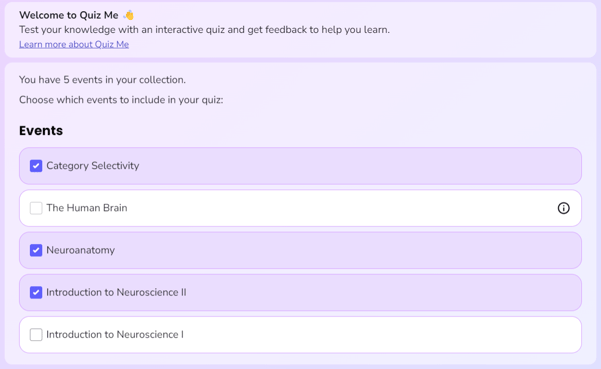
To help you build those connections, we’ve added Quiz Me in Collections. This allows you to quiz yourself on multiple Events at once.
Simply head to a Collection, click Quiz Me, and select up to 10 events you want to be quizzed on. You can choose your question count (5, 10 or 20) and your feedback timing, and Genio Notes will draw from each of your selected recordings to create a comprehensive set of study questions. It’s the ultimate way to see how well you’ve retained the "big picture" of your module.
Why use Quiz Me?
Active recall - the process of forcing your brain to retrieve information - is one of the most effective ways to move knowledge from your short-term to your long-term memory. By using Quiz Me regularly, you aren't just reading your notes, you're applying them and embedding your learning effectively.
Ready to try it out? Head over to Genio Notes and look for the Quiz Me icon in your next Event or Collection!
Share this blog





Time for a simpler, smarter note taking accommodation?